

Introduction
The Telenia widget library permits to connect your customer with operator logged on your TVox server using all licensed comunication channels.
The Telenia widget library delivers 2 functions:
- server connection interface.
- draw graphic elements to use server connection interface.
You can init server connection interface without use the graphic component.
Network
The server connection is initialized via https on port 443.
For video comunication WebRTC protocol is used. Ice server port comunication is 3478. Audio/video data is on DTLS through ports between 10000 and 20000.
External library used
This library and our demo need external library:
Widget
To use widget in your code you need to define a Widget object.
constructor(configuration: WidgetConfiguration)
In the constructor we need to pass the widget configuration.
| Properties | Type | Description |
|---|---|---|
| client | WidgetClient | Client object |
var widget = new Widget(widgetConf)
In this section are described the main methods of widget.
| Method | Description |
|---|---|
| onLoadClientComplete | widget is created |
| getServiceStatusForChannel | Service status monitor |
| widgetVisitUri | Pages of site visited by customer |
| sendCustomerIdentifier | Service and channel chosen by customer |
| disconnect | Disconnect widget from server |
| getChannelsEnabled | Get enabled channels from server |
onLoadClientComplete
onLoadClientComplete(action: function): void
This method requires a function that will be called after the creation of the widget object and when the client is ready to work.
var widget = new Widget(widgetConf)

widget.onLoadClientComplete(function() {

    console.log("I'm ready to work!")

    //for example we can log connection status
    widget.client.connectionEvent.subscribe(function (connectionEvent) {
        if(connectionEvent.connected) {
            console.log("Connected")
        } else {
            console.log("Not connected")
        }
    })
}
getServiceStatusForChannel
getServiceStatusForChannel(service: string, channel: MultiChannelType): Observable<ServiceStatus>
Get observable of service status by channel. After the subscription, all changes in the service status will be notified. Throw Error if service on channel is unmonitored as defined in configuration.
var widget = new Widget(widgetConf)

widget.onLoadClientComplete(function() {

    //for example we can log service status
    widget.client.getServiceStatusForChannel("service0001", "VIDEO").subscribe(function (statusForChannel) {
        if(statusForChannel && statusForChannel.service && statusForChannel.channelId && statusForChannel.status){
            console.log(`In channel ${statusForChannel.channelId} the status of service ${statusForChannel.service} is  ${statusForChannel.status}`)
        }
    })
}
widgetVisitUri
widgetVisitUri(linkableUri?: string, uri?: string, uriDisplay?: string): Promise
If the widget is displayed on many pages of the company site, the widget can send information to the server about the page of the site visited by the customer. The agent who answers a chat, phone call or video call with the customer can view this information in Tvox Web Client.
document.location.href
var widget = new Widget(widgetConf)

widget.onLoadClientComplete(function() {
    widget.widgetVisitUri(document.location.href, document.location.pathname, document.title)
})
sendCustomerIdentifier
sendCustomerIdentifier(channel: MultiChannelType, service: string): void
When the customer decides which channel and service to use to communicate with contact center, the widget must inform the server of this decision.
Service is a string of service id.
var widget = new Widget(widgetConf)

widget.onLoadClientComplete(function() {
    widget.sendCustomerIdentifier("CHAT", "service0001");
})
disconnect
disconnect() :void
Disconnect widget from server.
getChannelsEnabled
getChannelsEnabled(): { [key: string]: boolean }
were key is string of MultichannelType and boolean specify if channel is enabled or not on server.
enableDebug
enableDebug(target?: string)
Enable the whole log. Taget is a log filter, default is *.
disableDebug
disableDebug()
Disable all logs and enable the log only on Widget.
Call
To use the Call channel on your code, you must be sure that the "webrtc" parameter is present in the server parameter of the widget configuration.
When a real-time session is established, use the WebrtcManager class to manage the devices.
| Method | Description |
|---|---|
| callChannelSessionMonitor | Get monitor of call channel session |
| callChannelSessionMonitorStop | Stop monitoring call channel session |
| callChannelSessionNew | Create a call channel session |
| callChannelSessionClose | Close a call channel session |
callChannelSessionMonitor
public callChannelSessionMonitor(): Observable<CallChannelSession>
Get monitor of call channel session
callChannelSessionMonitorStop
Stop notification of call channel session
callChannelSessionNew
callChannelSessionNew(service: string, customerName?: string, customerMail?: string, callMeOnThisNumbe?: string, fields?: MultiChannelSessionCustomField[], formId?: string, widgetID?: string): Promise<string>
Create a call channel session. The service id must be specified. The customer's name and email are optional. If you have not already configured customer information in the widget configuration and do not set the customer name in this method, the agent in the TVox client will receive an anonymous call session.
This method return a promise with session id.
callChannelSessionClose
callChannelSessionClose(sessionId: string): Promise<boolean>
close a call channel session. You must pass the session id of the active call session.
Chat
To use chat in your code you need to define a ChatSession object.
newChatSession(service: string, fields?: MultiChannelSessionCustomField[], formId?: string, widgetID?: string, firstMessage?: string): ChatSession
This object is the basis for a chat session and with this object we have access to all chat session methods. It is necessary to pass the chosen service and, optionally, the customer's name and e-mail. If you have already set up customer information in the configuration, there is no need to pass it now. If you don't pass any names and emails and have not set up customer information in the configuration, the agent on the web client will receive an anonymous chat request.
Param fields is not available in this version.
| Method | Description |
|---|---|
| createChatChannelSession | Start a chat session |
| getChatChannelSessionMonitor | Session status notifications |
| getChatChannelEventMonitor | Messages and events notifications |
| chatSendMessage | Send a message |
| chatChannelReceivedMessage | Marks an inbound message as received |
| chatChannelReadMessage | Marks an inbound message as read |
| chatSendInteractiveOption | Sends an interactive option selected by the user within a chat session |
| chatSendRecapOfSession | Sends chat session history by e-mail |
| chatChannelSessionClose | Close chat session |
var chatSession = widget.newChatSession("support0001", null, "Mario Rossi", "rossimario@example.com");
createChatChannelSession
createChatChannelSession(): Promise<ChatChannelSession>
Send a request to TVox to start a chat session with an agent.
var chatSession = widget.newChatSession("support0001", null, "Mario Rossi", "rossimario@example.com");
chatSession.createChatChannelSession()
    .then((result) => {
        console.log(`Result of chat session creation: ${JSON.stringify(result)}`)
    }).catch((err) => {
        console.log(`Error of chat session creation: ${JSON.stringify(err)}`)
    })
getChatChannelSessionMonitor
getChatChannelSessionMonitor(): Observable<ChatChannelSession>;
Use this method to get notifications of session status. Subscribe on this method after createChatChannelSession
var chatSession = widget.newChatSession("support0001", null, "Mario Rossi", "rossimario@example.com");

var sessionMonior = chatSession.getChatChannelSessionMonitor()

chatSession.createChatChannelSession()
    .then((result) => {
        sessionMonior.subscribe((sessionMonitor) => {
            //for example we can log session state
            if (sessionMonitor.sessionState) {
                console.log(`Session state notified: ${sessionMonitor.sessionState}`)
            }
        })
    })
getChatChannelEventMonitor
getChatChannelEventMonitor(): LiveResult<ChatChannelEventMessage,ChatChannelEventMessage>
Use this method to get notifications of all messages of chat channel session. Subscribe on this method after createChatChannelSession
See LiveResult documentation to learn this interface
var chatSession = widget.newChatSession("support0001", null, "Mario Rossi", "rossimario@example.com");

var sessionMonior = chatSession.getChatChannelSessionMonitor()
var eventMonitor = chatSession.getChatChannelEventMonitor()

chatSession.createChatChannelSession()
    .then((result) => {
        sessionMonior.subscribe((sessionMonitor) => {

            //if session is close stop notification on event monitor
            if (sessionMonitor.sessionState && result.sessionState == "CLOSED") {
                eventMonitor.stopNotification();
            }
        })

        eventMonitor.result.subscribe((eventMonitorResult) => {
            console.log(`Event monitor result is: ${JSON.stringify(eventMonitorResult)}`);
        });

        eventMonitor.notification.subscribe((eventMonitorNotification) => {
            switch (notification.status) {
                case "WROTE":
                    // The message is wrote, check the direction and show the sent / received message
                    break
                case "COMPOSING":
                    // Someone is composing a message, check direction and show composing icon
                    break;
                case "IDLE":
                    // Nobody is composing a message, hide the composing icon
                    break;
            }
        })
    })
chatSendMessage
chatSendMessage(message: string, status: ChatChannelEventMessageStatus, notifyGreetingMessage: boolean): Promise<boolean>
Send a message to this chat session. You must pass the message, the status and notifyGreetingMessage. If notificationGreetingMessage is true, this message will be displayed as a message sent by the agent and not by the customer. Use this function to send a personalized welcome message from the widget to Tvox or to send the history of a previous chat with an external bot.
You can send message only when sessioMonitor.step.type is "CONNECTED".
var chatSession = widget.newChatSession("support0001", null, "Mario Rossi", "rossimario@example.com");

var sessionMonior = chatSession.getChatChannelSessionMonitor()

chatSession.createChatChannelSession()
    .then((result) => {
        sessionMonior.subscribe((sessionMonitor) => {
            if (sessionMonitor.sessionState && result.sessionState === "ACTIVE") {
                if(sessionMonitor.step && sessionMonitor.step.type && sessionMonitor.step.type === "CONNECTED" ) {
                    chatSession.chatSendMessage("Can I get some help, please?", "WROTE", false);
                }
            }
        })
    })
chatChannelReceivedMessage
chatChannelReceivedMessage(messageId: string): void
Inform the server that the widget received the message, messageId is the id of the message received.
chatChannelReadMessage
chatChannelReadMessage(messageId: string): void
Inform the server that the widget has read the message, messageId is the id of the message read.
chatSendInteractiveOption
chatSendInteractiveOption(action: ChatChannelInteractiveOptionAction) : Promise<boolean>
Sends an interactive option selected by the user within a chat session.
chatSendRecapOfSession
chatSendRecapOfSession(mail: string): Promise<boolean>
Send a copy of chat session to customer by e-mail. To use this method, TVox must have MAIL channel enabled and configured for manage tickets.
chatChannelSessionClose
chatChannelSessionClose(): void
Close chat channel session and stop session notification
Video
To use the video channel on your code, you must be sure that the "webrtc" parameter is present in the server parameter of the widget configuration.
When a real-time session is established, use the WebrtcManager class to manage the devices.
| Method | Description |
|---|---|
| videoChannelSessionMonitor | Get monitor of video channel session |
| videoChannelSessionMonitorStop | Stop monitoring video channel session |
| videoChannelSessionNew | Create a video channel session |
| videoChannelSessionClose | Close a video channel session |
| echoTestertSessionNew | Test devices and connection |
| getLocalMediaAvailable | Get local media devices enabled |
videoChannelSessionMonitor
videoChannelSessionMonitor(): Observable<VideoChannelSession>
Get monitor of video channel session
var monitor = widget.videoChannelSessionMonitor()
monitor.subscribe(function (result) {
    //for example, we can log the state of the session and if the session is IDLE, we stop monitoring the session
    if (result.state) {
        console.log(`Session state is ${result.state}`)
        if(result.state === 'IDLE') {
            widget.videoChannelSessionMonitorStop()
        }
    }
})
videoChannelSessionMonitorStop
videoChannelSessionMonitorStop(): void
Stop notification of video channel session
videoChannelSessionNew
videoChannelSessionNew(service: string, customerName?: string, customerMail?: string, fields?: MultiChannelSessionCustomField[], formId?: string, widgetID?: string ): Promise<string>
Create a video channel session. The service id must be specified. The customer's name and email are optional. If you have not already configured customer information in the widget configuration and do not set the customer name in this method, the agent in the TVox client will receive an anonymous video call.
The optional "fields", "formId" and "widgetID" attributes are also available for forms with custom fields. To use these attributes it is necessary to configure a widget form on Tvox Configurator.
This method return a promise with session id.
videoChannelSessionClose
videoChannelSessionClose(sessionId: string): Promise<boolean>
close a video channel session. You must pass the session id of the active video session.
var sessionId = ''
widget.videoChannelSessionNew("support0001").then(function(result) {
    sessionId = result
})

...
...

widget.videoChannelSessionClose(sessionId).then(function(result){
    if(result) {
        console.log("Session closed")
    }
})
echoTestertSessionNew
echoTestertSessionNew(audio: boolean, video: boolean): Subject<EchoTestSessionOb>
Start an audio and/or video streaming test with TVox checking the devices and the connection. Returns a subject who notifies the duration of the test, details during the test, and finally the test results.
client.echoTestertSessionNew(true, true).subscribe(function(testResult) {
    $info.append(`Connection test: ${JSON.stringify(testResult)}\n`);
    if (testResult.state === "SUCCESS") {
        //Test OK
    } else if (testResult.state === "FAILED") {
        //test KO
        console.log(testResul.error)
    }
});
getLocalMediaAvailable
getLocalMediaAvailable(): Promise<MediaDeviceEnabled>
Get local media enabled devices. Returns a promise with an object specifying which devices are available.
client.getLocalMediaAvailable().then((mediaDeviceEnabled) => {
    console.log(`Devices enabled: ${JSON.stringify(mediaDeviceEnabled)}\n`);
});
WebRTCManager
This class manages webrtc sessions. With methods of this class it is possible to manage all the communication functions in real time.
| Properties | Type | Description |
|---|---|---|
| enable | boolean | WebRTC enabled |
| device | WebrtDeviceManager | Device Manager Class |
toggleAudioMute
toggleAudioMute(sessionId: string): Promise<boolean>;
Enable / disable microphone. The session starts with audio enabled, the microphone is deactivated the first time you use this method, and then it is restored at the second use. You have to pass the sessionId.
widget.client.webrtc.toggleAudioMute(sessionId);
toggleVideoMute
toggleVideoMute(sessionId: string): Promise<boolean>
Enable / disable webcam. The session starts with video enabled, the webcam is deactivated the first time you use this method, and then it is restored at the second use. You have to pass the sessionId.
widget.client.webrtc.toggleVideoMute(sessionId);
WebrtDeviceManager
This class allows you to manage audio and video devices for real time sessions
| Method | Description |
|---|---|
| getMediaDevice | Get an enumeration of available device. |
| setMediaDevice | Set the devices you have chosen |
| testMediaDevice | Start a test of the devices you have chosen |
| stopTestMediaDevice | stop test media device |
| getLocalMediaTestAudioLevel | get number of local audio level |
getMediaDevice
getMediaDevice(startMedia: boolean, acquireAudio?: boolean, acquireVideo?: boolean): Promise<MediaDevice>
Get an enumeration of available device. If startMedia is true it request permission to usage devices (default was audio and video if available) to retrive description of every device, otherwise return only id
widget.client.webrtc.device.getMediaDevice(true).then((devices) => {
    .....
})
setMediaDevice
setMediaDevice(audio_input: SourceInput, video_input: SourceInput | null |boolean, audio_output: SinkOutput | null, audio_signal_output: SinkOutput | null): Promise<void>
Set the devices you have chosen
testMediaDevice
testMediaDevice(audio_input: SourceInput, video_input: SourceInput, audio_output: SinkOutput, videoContainer: HTMLElement): Promise<boolean>
Start a preview of the chosen devices. The devices that want to be tested must be passed as input to the method. The videocontainer is the html element in which you want to play the video stream
stopTestMediaDevice
stopTestMediaDevice(): Promise<boolean>
Stops the preview of devices
getLocalMediaTestAudioLevel
getLocalMediaTestAudioLevel(): Observable<number>
Returns an observable that notifies the instantaneous volume of the local device audio input.
SourceInput
| Method | Return | Description |
|---|---|---|
| getId() | string | Gets the identifier of source |
| getName() | string | Gets the name of source |
| toJson() | string | Serializes this instance to JSON |
| toString() | string | Returns a string that represents this instance |
SinkOutput
| Method | Return | Description |
|---|---|---|
| getId() | string | Gets the identifier of source |
| getName() | string | Gets the name of source |
| toJson() | string | Serializes this instance to JSON |
| toString() | string | Returns a string that represents this instance |
Interfaces
WidgetClient
| Parameter | Type | Description |
|---|---|---|
| connectionEvent | Observable<ConectionEvent> | Observable of connection state, event emitted when connection changed |
| loginProfile | Observable<LoginProfile> | object that offer a map of user |
| webrtc | WebRTCManager | WebRTC manager |
| options | WidgetCong | Widget configutation |
WidgetConf
var widgetConf = {
    server: {
      url: "https://contact.teleniasoftware.com"
    },
    servicesConfiguration: [
        {
            type: "CHAT",
            services: [
                {
                    code: "service0001",
                    descritpion: "Commercial service"
                },
                {
                    code: "service0002",
                    descritpion: "Support service"
                }
            ]
        }
    ],
    customerInfo: {
        customerDisplayName: "Mario Rossi",
        customerValue: "rossimario@example.com"
    }
  };
| Parameter | Type | Description |
|---|---|---|
| server | ServerInterface | Configuration for server features |
| servicesConfiguration? | ChannelServicesConfiguration [ ] | List of channels and services to use |
| channels? | MultiChannelServiceMonitor | Similar to servicesConfiguration |
| customerInfo ? | CustomerInfo | Customer information |
| customerDisplayName? | String | Customer name |
| customerId? | String | Customer mail |
| graphics ? | GraphicsConfigurationInterface | Graphic Conficuration |
ServerInterface
| Parameter | Type | Description | Default |
|---|---|---|---|
| url | string | Server address | |
| webrtc ? | WebrtcConfig | WebRTC session configuration object - required if you need a phone/video channel session | null |
| heartbeatInterval ? | number | server ping interval in milliseconds | 5000 ms |
| retryOptions ? | RetryOptionsInterface | Reconnecting configuration | Never stop retry every 10s |
var server = {
    url: "https://contact.teleniasoftware.com"
}
ChannelServicesConfiguration
Configurarion of single channel
| Parameter | Type | Description |
|---|---|---|
| type | MultiChannelType | Type of channel |
| services | ServiceConfiguration [] | Array of services and their configuration |
var channelServiceConfiguration = {
    type: "CHAT",
    services: [
        {
            code: "service0001",
            descritpion: "Servizio commerciale"
        },
        {
            code: "service0002",
            descritpion: "Servizio assistenza"
        }
    ]
}
MultiChannelServiceMonitor
Channel configuration
| Parameter | Type | Description |
|---|---|---|
| services | string[] | array of services code |
| type | MultiChannelType | Channel type |
ServiceConfiguration
Configurarion of services
| Parameter | Type | Description |
|---|---|---|
| code | string | code of service |
| description | string | description of service |
CustomerInfo
Customer information
| Parameter | Type | Description | Default |
|---|---|---|---|
| customerDisplayName | string | Customer display name | |
| customerFirstName ? | string | Customer first name | null |
| customerLastName ? | string | Customer last name | null |
| customerId ? | string | Customer id (ex id of address book) | null |
| customerValue ? | sring | Customer value (ex mail) | null |
| customerPhoneNumber ? | string | Customer phone number | null |
| customerCompany ? | string | Customer company | null |
var customerInfo = {
    customerDisplayName: "Mario Rossi",
    customerValue: "rossimario@example.com"
}
ServiceStatus
Service's status notified
| Parameter | Type | Description |
|---|---|---|
| channelConfiguration ? | ConfigurationStatus | Channel configuration status |
| channelId ? | MultiChannelType | Channel id |
| service ? | string | Service code |
| serviceConfiguration? | ServiceConfigurationStatus | Service configuration status |
| status ? | ServiceStatusValue | Service status |
ConnectionEvent
| Parameter | Type | Description |
|---|---|---|
| connected | boolean | Connection's state - connected or not |
Loginprofile
| Parameter | Type | Description |
|---|---|---|
| status ? | LoginProfileStatus | Profile's status |
| logged ? | boolean | logged value |
| username ? | string | The username |
| name ? | string | The name |
| surname ? | string | The surname |
LiveResult
LiveResult
LiveResult is an interface used in sessions for notification subscribes. It is composed by two observables, one for the result of notification request and one for future notifications. When notifications aren't needed yet, the method stopNotification stops them.
| Parameter | Type | Description |
|---|---|---|
| result | Observable< R > | Subscribe to this observable for send request and receive request result |
| notification | Observable< L > | Subscribe to this observable for receive futures notifications |
| stopNotification: () | Promise |
Request to stop notifications |
ChatChannelEventMessage
Chat message interface
| Parameter | Type | Description |
|---|---|---|
| message? | string | Exchanged message |
| messageType? | ChatMessageType | Type of message identify normal message or open/closed session message |
| status? | ChatChannelEventMessageStatus | Status of message by sender |
| createdAt? | string | Event created at, date as string |
| direction? | Direction | Event direction |
| id? | string | Event id |
| sessionId? | string | Event session id |
ChatChannelSession
Extends MultiChannelSession
ChatChannelInteractiveOptionAction
| Parameter | Type | Description |
|---|---|---|
| interactiveOption | ChatChannelInteractiveOptionReply | The selected interactive option |
| originMessageId | string | ID of the original message that triggered the interactive option |
| sessionId | string | ID of the current chat session |
ChatChannelInteractiveOptionReply
| Parameter | Type | Description |
|---|---|---|
| id | string | Unique identifier of the option |
| label | string | Display label shown to the user |
| description | string | Additional descriptive text for the option |
VideoChannelSession
Extends MultiChannelSession
| Parameter | Type | Description |
|---|---|---|
| start? | String | call's start time as string |
| time? | String | system time as string |
| state? | CallState | call's state |
EchoTestSessionObj
| Parameter | Type | Description |
|---|---|---|
| state? | EchoSessionState | Current state of the test |
| estimatedTime | number | Estimated test duration time |
| echoSessionObject? | EchoTestSession | Advanced test information |
| details? | string | Optional test details |
| error? | EchoSessionError | Error enum in case of failed test |
MediaDeviceEnabled
| Parameter | Type | Description |
|---|---|---|
| audio_input | boolean | Microphone available |
| video_input | boolean | Webcam available |
| desktop | boolean | Desktop sharing available |
| audio_output | boolean | Speaker available |
CallChannelSession
Extends MultiChannelSession
| Parameter | Type | Description |
|---|---|---|
| start? | String | call's start time as string |
| time? | String | system time as string |
| state? | CallState | call's state |
MultiChannelSession
| Parameter | Type | Description |
|---|---|---|
| id | string | Session id |
| service? | string | Session's current service |
| sessionState? | MultiChannelState | Session state |
| step? | MultiChannelStepUnion | Step to do |
| operator? | ContactIdentifierWithDisplayName | Operator's cpmtact |
MultiChannelStepUnion
Step for channel session, this interface is generic for all channel session.
MultiChannelStepQueue | MultiChannelStepPlay | MultiChannelStep | MultiChannelStepToUrl | MultiChannelStepInactivityTimeout
MultiChannelStepQueue
Queue step, when session is on queue. Extends MultiChannelStep
| Parameter | Type | Description |
|---|---|---|
| queuePosition ? | number | Channel session's queue position - if null information is not available. |
MultiChannelStepPlay
Play step, when session is play something to customer. Extends MultiChannelStep
| Parameter | Type | Description |
|---|---|---|
| welcomeMessage ? | string | Message on waiting the right connect state. |
MultiChannelStepToUrl
Session's action that say to change page uri. Please redirect to uri. Extends MultiChannelStep
| Parameter | Type | Description |
|---|---|---|
| uri? | string | Uri to redirect widget page |
MultiChannelStepInactivityTimeout
Connection is expiring for inactivity timeout. Extends MultiChannelStep
| Parameter | Type | Description |
|---|---|---|
| inactivityExpireDatetime? | number | Time when session expired |
MultiChannelStep
| Parameter | Type | Description |
|---|---|---|
| step? | number | Step of session |
| type? | MultiChannelStepType | Step's type |
WebrtcConfig
Webrtc configuration
| Parameter | Type | Description |
|---|---|---|
| enabled | boolean | If WebRTC is enabled or not |
| trickleIcePolicy? | TrickleIcePolicy | trickle ice policy |
| iceGatherPolicy? | IceGatherPolicy | Ice gather policy |
| videoContainer? | HTMLElement | Video output html container |
ContactIdentifierWithDisplayName
Extends ContactIdentifier
| Parameter | Type | Description |
|---|---|---|
| displayName? | string | Operator's display name |
ContactIdentifier
| Parameter | Type | Description |
|---|---|---|
| type? | AddressBookContactType | Type of contact |
| uid? | string | Identifier on addressbook |
| username? | string | username |
| value? | string | contact email |
MediaDevice
| Parameter | Type | Description |
|---|---|---|
| audio_input | SourceInput[] | Array of audio input devices |
| video_input | SourceInput[] | Array of video input devices |
| audio_output | SinkOutput[] | Array of audio output devices |
MultiChannelSessionCustomField
| Parameter | Type | Description |
|---|---|---|
| id? | string | custom field's id |
| label? | string | custom field's label - show to user |
| value? | string | custom field's value - show to user |
Enum
MultiChannelType
Enum of channel type
| Enum | Value | Description |
|---|---|---|
| PHONE_CALL | "PHONE_CALL" | Phone channel |
| VIDEO | "VIDEO" | Video channel |
| CHAT | "CHAT" | Chat channel |
| "MAIL" | Ticket channel | |
| CALLBACK | "CALLBACK" | Call back channel |
ConfigurationStatus
Service or channel configuration
| Enum | Value | Description |
|---|---|---|
| DISABLED | "DISABLED" | Disabled |
| ENABLED | "ENABLED" | Enabled |
| NOT_FOUND | "NOT_FOUND" | Not found |
| NO_LICENSE | "NO_LICENSE" | No license present on server |
| FAILED | "FAILED" | Generic error |
ServiceStatusValue
Service status
| Enum | Value | Description |
|---|---|---|
| ACTIVE | "ACTIVE" | Service open with logged user |
| OUT_OF_SERVICE | "OUT_OF_SERVICE" | Service open without logged user |
| OVERTIME | "OVERTIME" | Service closed, out of calendar defined on service |
| FAILED | "FAILED" | Generic error |
ChatChannelEventMessageStatus
| Enum | Value | Description |
|---|---|---|
| WROTE | "WROTE" | Message wrote |
| COMPOSING | "COMPOSING" | Message on composing |
| IDLE | "IDLE" | No message composing |
ChatMessageType
| Enum | Value |
|---|---|
| MESSAGE | "MESSAGE" |
| CLOSED_SESSION | "CLOSED_SESSION" |
| OPEN_SESSION | "OPEN_SESSION" |
Direction
| Enum | Value |
|---|---|
| INBOUND | "INBOUND" |
| OUTBOUND | "OUTBOUND" |
MultiChannelState
| Enum | Value |
|---|---|
| ACTIVE | "ACTIVE" |
| CLOSED | "CLOSED" |
MultiChannelStepType
| Enum | Value | Description |
|---|---|---|
| QUEUE | "QUEUE" | Session on queue |
| PLAY | "PLAY" | Session to play message (text, audio, video) |
| CONNECTING | "CONNECTING" | Session to connecting to operator |
| CONNECTED | "CONNECTED" | Session is connected |
| TO_URL | "TO_URL" | Redirect widget page to uri |
| INACTIVE_TIMEOUT | "INACTIVE_TIMEOUT" | Notify inactive state after timeout |
| ACTIVE_FROM_TIMEOUT | "ACTIVE_FROM_TIMEOUT" | Notify acrive state after timeout |
| MAX_DURATION_TIMEOUT | "MAX_DURATION_TIMEOUT" | Notify inactive state after max duration timeout |
TrickleIcePolicy
| Enum | Value |
|---|---|
| 1 | "NotSupported" |
| 2 | "FullTrickle" |
| 3 | "HalfTrickle" |
IceGatherPolicy
| Enum | Value |
|---|---|
| 1 | "All" |
| 2 | "NoHost" |
| 3 | "Relay" |
CallState
| Enum | Value | Description |
|---|---|---|
| NEW_INBOUND | "NEW_INBOUND" | New inbound call |
| NEW_OUTBOUND | "NEW_OUTBOUND" | New outbound call |
| CONNECTED | "CONNECTED" | Call connected, answered |
| CONFERENCED | "CONFERENCED" | Call transfer to conference |
| HOLD | "HOLD" | Call pause |
| IDLE | "IDLE" | Call close |
EchoSessionState
| Enum | Value |
|---|---|
| START | "START" |
| ELABORATION | "ELABORATION" |
| SUCCESS | "SUCCESS" |
| FAILED | "FAILED" |
| END | "END" |
EchoSessionError
| Enum | Value | Description |
|---|---|---|
| ECHO_TEST_NO_MEDIA_SELECTED | "ECHO_TEST_NO_MEDIA_SELECTED" | Audio and video can not be both false |
| ECHO_TEST_NOT_AVAILABLE | "ECHO_TEST_NOT_AVAILABLE" | Echo test is not available |
| ECHO_TEST_MISSED_ANSWER | "ECHO_TEST_MISSED_ANSWER" | The echo test does not respond |
| ECHO_TEST_DOM_PERMISSION_DENIED | "ECHO_TEST_DOM_PERMISSION_DENIED" | The Dom does not allows to use Microphone or Webcam |
AddressBookContactType
| Enum | Value | Description |
|---|---|---|
| USER | "USER" | user |
| SERVICE | "SERVICE" | service |
| SERVICE_CODE | "SERVICE_CODE" | service code |
| SHORT_NUMBER | "SHORT_NUMBER" | short number |
| EXTERNAL_ITEM | "EXTERNAL_ITEM" | external contact |
| EXTERNAL_ORGANIZATION | "EXTERNAL_ORGANIZATION" | external organization |
| PERSONAL_ITEM | "PERSONAL_ITEM" | personal |
| UNKNOWN | "UNKNOWN" | lookup without result |
| MULTIPLE | "MULTIPLE" | multiple lookup result |
| ERROR | "ERROR" | error on lookup |
| DELAYED | "DELAYED" | notify that contact lookup is delayed |
| ANONYMOUS | "ANONYMOUS | caller does not show his number |
LoginProfileStatus
| Enum | Value | Description |
|---|---|---|
| UNKNOWN | "UNKNOWN" | User without authetication |
| LOGGED | "LOGGED" | Correctly logged |
| NOTLOGGED | "NOTLOGGED" | User not logged |
| RETRY | "RETRY" | Login incorrect |
| REFRESH | "REFRESH" | Update user login |
| SOCKET_NOTLOGGED | "SOCKET_NOTLOGGED" | Socket not logged (not used in the widget) |
| PASSWORD_EXPIRED | "PASSWORD_EXPIRED" | Password expired (not used in the widget) |
| SOCKET_CLOSED_REQUEST_FORCE | "SOCKET_CLOSED_REQUEST_FORCE" | If only one session is allowed, close sockets (not used in the widget) |
| SOCKET_CLOSED_BY_USER | "SOCKET_CLOSED_BY_USER" | If only one session is allowed, other user force to close socket (not used in the widget) |
| SOCKET_CLOSED_USER_NOT_ENABLED | "SOCKET_CLOSED_USER_NOT_ENABLED" | User can not use webclient or app from LAN (not used in the widget) |
| SOCKET_CLOSED_USER_NOT_ENABLED_MCS | "SOCKET_CLOSED_USER_NOT_ENABLED_MCS" | User can not use webclient or app from external network (not used in the widget) |
Use and Demo
The widget directory is made up of 3 directories
- cross-storage
- dist
- demo
cross-storage use is not available in this version.
The javascript library to be imported into your project is in dist/bundle. In this directory there are 2 identical libraries, widget.js (not minimized) and widget.3cda6a6022627fa3ef5e.js (minimized).
To show an example of using the widget library, a demo per channel is available in the source code.
Video Demo
The video demo shows how to instantiate a video session. The sources of this demo are:
demo/video.htmldemo/lib/wtest.js
wtest.js have a lot of comments for show how to use the library.
Before starting the demo you must configure a service with video channel on TVox and you must configure an agent in a skillset with this service associated.
When you start the demo you must set:
- the TVox url
- customer name
- service code
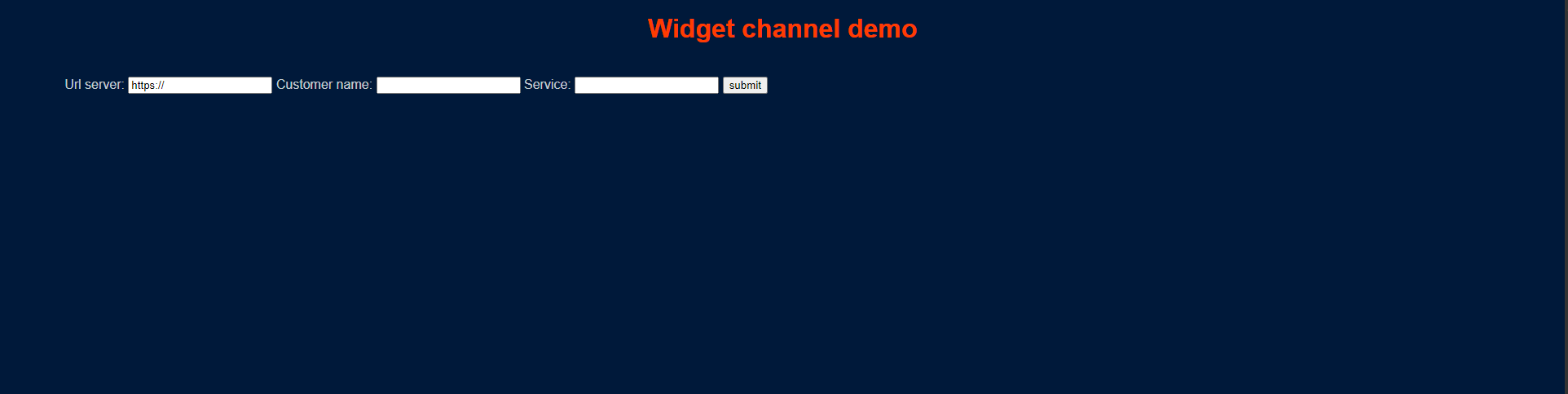
The TVox url is the TVox address like "test.teleniasoftware.com" or static IP like "X.X.X.X".
The service is a contact center service with video channel enabled. You have to configure it on the Tvox settings.
On the left of the screen there is an area dedicated to video layout and utility buttons, on the right there is an area with session log.
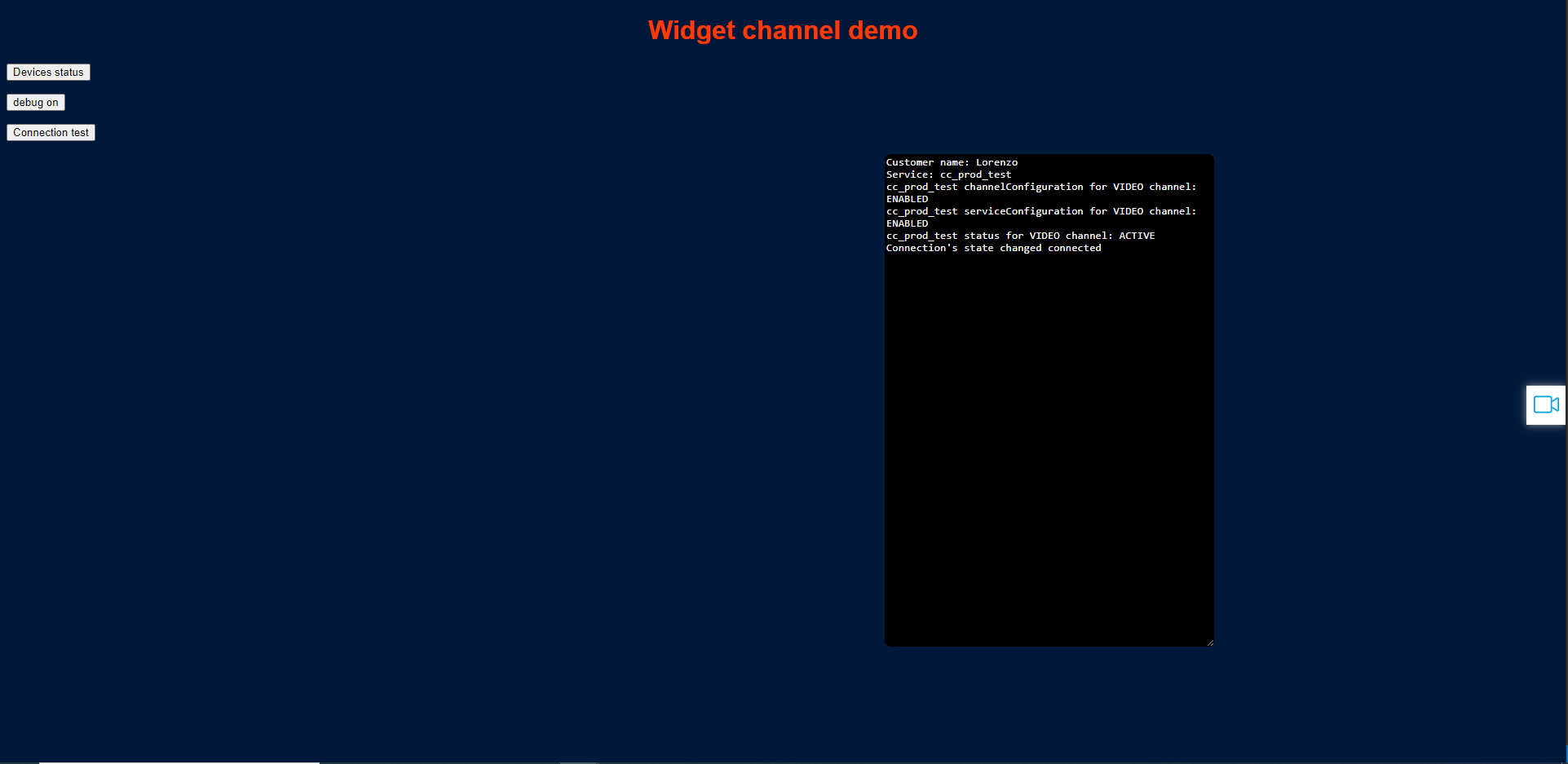
When the video service is available, the video button appears on the right. Clicking on it starts a video session.
Download
Download here the library pack with demo
Changes from 10.23
This section describes the differences between the 10.23 widget and the 10.26 widget (the 10.26 widget is now renamed v2.0)
- In widget object the old observable statusEvent of widget.client has been refactored to loginProfile. See the documentation and demo for usage examples.
- In video channel, attributes have been added to the videoChannelSessionNew method to manage the ability to request custom fields from the customer. These attributes are optional, so the old use of the method is kept.
- In call channel, attributes have been added to the callChannelSessionNew method to manage the ability to request custom fields from the customer. These attributes are optional, so the old use of the method is kept.
- In chat channel the method newChatSession has been totally changed because the server side chat has changed.